
Simple Calendar Pro
Simple Mobile ToolProductivity
4.62.02K Reviews
- Version
- 6.23.1
- Installs
- 500.00K
- Age Rating
- Everyone
Screenshots
Our Review of Simple Calendar Pro
 Analysis by Appyee
I tend to judge a calendar by how quickly it helps me answer one question: what does the rest of my day look like? Simple Calendar Pro is built around that practical job. It is an Android productivity app from Simple Mobile Tool, and its appeal is the directness of using a calendar to keep appointments, plans, and reminders in view without turning scheduling into a project of its own.
A calendar that keeps the schedule in focus
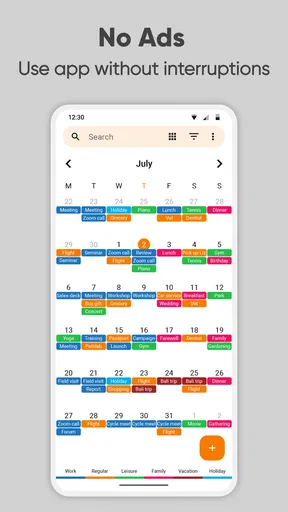
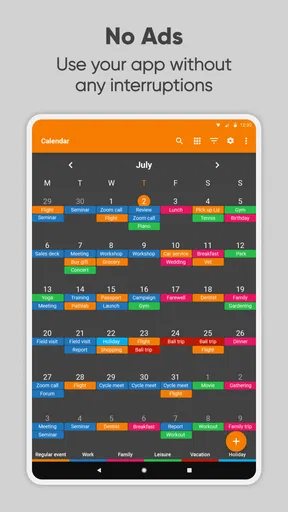
The useful idea here is not that a calendar can hold events; every calendar can do that. It is that a clear, glanceable schedule can make everyday planning feel less scattered. When I separate work, personal plans, and flexible tasks with different colors, I can scan the week and understand its shape before opening individual events. That is more useful than a long list when I am deciding whether I can fit one more commitment into an already crowded day.
This approach suits people who want their calendar to stay a calendar. I would not choose it expecting a full project-management system, a shared family workspace, or a task database. Its strength is helping me see when things happen, set reminders, and keep a personal routine organized. If those are the main problems I want to solve, a focused tool can be easier to live with than a broader app that asks me to manage several kinds of information at once.
How I would use it through a busy day
A realistic routine might start the night before: I check tomorrow’s appointments, give work and personal events distinct colors, and set reminders for commitments that would be costly to forget. In the morning, a quick look at the schedule tells me where the fixed points are. I can then leave realistic gaps for travel, meals, or a task that may take longer than expected. The calendar cannot make a packed day less packed, but it can make the conflicts visible before they catch me off guard.
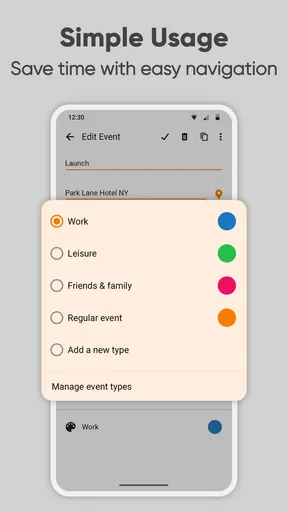
Color-coding works best when I keep the system small. I would pick a few meanings and stick to them rather than assigning a new color to every kind of event. For example, one color for work and another for personal commitments is often enough to make the week easier to scan. Too many categories can turn color into decoration instead of information. This is a small habit, but it is the difference between a calendar that looks organized and one that actually helps me make decisions.
Reminders also benefit from a little restraint. If I add alerts to every minor event, they stop feeling useful; if I reserve them for appointments, deadlines, and plans that need preparation, they become a dependable prompt. I would use the calendar view to understand timing and reminders to protect the events I must act on. That division keeps the app from becoming another source of constant interruptions.
Where it fits among calendar choices
Compared with a feature-heavy calendar, a simpler planner can feel calmer because its purpose is easier to grasp. People who already use a large platform calendar for collaboration or rely on its wider ecosystem may prefer to stay there, especially if they need other people to edit events or want scheduling to connect tightly with additional services. I see this app as a better fit for someone who values a straightforward personal view over a hub for every work and household workflow.
It can also make sense alongside an existing calendar rather than as an all-or-nothing replacement. If someone keeps appointments in a service they already use, synchronization can help bring those events into a more comfortable day-to-day view. Before relying on that setup, I would check that the calendars I need are selected and that a recent change appears where I expect it. Sync is most useful when it reduces duplicate entry; if I find myself maintaining the same event in two places, the arrangement is creating work rather than saving it.
That trade-off matters for anyone deciding whether to move an established schedule. A calendar may look simple on the phone while still depending on the account or service where events are stored. I would first try it with a small set of routine plans, verify that edits and reminders behave as I need, and only then make it the main place I check. A gradual switch is safer than transferring every commitment at once and discovering later that a familiar workflow no longer suits me.
The everyday scenario where it earns its place
Imagine a week with a work meeting, a medical appointment, and a personal commitment all competing for attention. I would add each at the time it is confirmed, use a consistent color for each broad area of life, and set a reminder for the appointment that needs preparation. Looking across the week then shows not only the events themselves but also where the open spaces are. That makes it easier to say yes or no to a new invitation without relying on memory or double-booking myself.
For a student, the same habit can separate classes from personal plans; for a freelancer, it can make client calls and non-work commitments easier to distinguish. The value is not a special trick for one profession. It is the modest but important reduction in mental bookkeeping: I do not have to keep rehearsing every appointment in my head just to remember what comes next.
Offline access is particularly handy when I need to check an existing plan somewhere with no connection, such as during a flight. I would still make important changes when I can confirm that they have been saved and, if I use synchronized calendars, check that they carry through as expected. Being able to consult a schedule offline is reassuring, but it should not be confused with every change instantly appearing across services without a connection.
Small choices that make the setup work
Personalization is useful when it improves readability rather than merely changing the look. I would set the week to begin on the day that matches my routine and adjust the text size until event names are comfortable to scan. Someone who plans around a Monday-to-Friday workweek may prefer a Monday start, while another person may find a different starting day more natural. The point is to make the displayed week match how I actually think about time.
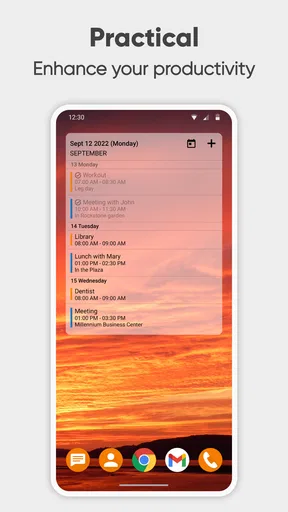
Widgets can make a calendar more immediately visible, but their usefulness depends on how much detail I want on the home screen. A compact view is convenient for checking the next commitment; a fuller view may show more of the week but take up space that I use for other things. I would try a layout for a few days and judge it by whether I check the schedule more reliably, not by whether the screen looks busier. A widget should reduce steps, not become another display I ignore.
There is also a practical distinction between entering an event quickly and entering it carefully. For a simple appointment, speed matters. For something recurring or likely to change, I would pause to review the time and reminder before saving, then check the event in the calendar view. That quick confirmation is worthwhile because a clean interface cannot prevent a mistaken time or an overlooked detail. The app helps me organize information; I still need a reliable habit for entering it.
What to weigh before committing
The minimalist approach has limits. If I want a tool that combines detailed task tracking, team coordination, and complex planning in one place, a dedicated task manager or a more expansive calendar may be a better choice. Likewise, people who depend on shared scheduling should make sure their existing way of coordinating with others remains convenient. Simplicity is a genuine advantage only when the app’s boundaries line up with the job I need done.
My other caution is not to mistake a tidy calendar for a complete planning method. Events show when something is scheduled, but they do not automatically tell me how much preparation it needs or whether I have allowed enough time between commitments. I get more value when I add realistic event times, leave breathing room, and review the next day before it begins. Without those habits, any calendar can become a colorful record of an overfilled week.
The app is priced at $2.99, carries an Everyone age rating, and has an average rating of 4.6 from around 23,000 ratings, with roughly 2,000 written reviews and over 500,000 installs. It was released on November 16, 2018, and version 6.23.1 requires Android 6.0 or later. Those figures give a sense of its established audience, but they do not tell me whether its focused style suits an individual routine; the best test is whether I can keep my real schedule clear in it.
First Impressions
Right off the bat, Simple Calendar Pro lives up to its name. The installation was a breeze, and before I knew it, I was diving headfirst into its clean and minimalistic interface. There's something so refreshing about an app that doesn’t bombard you with ads or unnecessary features. It's just pure, unadulterated calendar goodness.
The app is designed with simplicity in mind, which means there’s no steep learning curve. Whether you’re tech-savvy or just looking for a no-frills calendar solution, you’ll feel right at home here. The interface is intuitive, and everything is exactly where you’d expect it to be. It’s like the app can read your mind!
Features That Matter
Let’s talk about the features. While Simple Calendar Pro keeps things straightforward, it doesn’t skimp on the essentials. You can easily create events, set reminders, and color-code your entries. The color-coding feature is a game-changer for visual organization. I love being able to glance at my schedule and immediately know what’s work-related, what’s personal, and what’s just for fun.
There’s also an option to sync with other calendars. This is a lifesaver if, like me, you juggle multiple platforms. Google Calendar, anyone? The synchronization is seamless, ensuring you never miss a beat.
A User Experience That Delivers
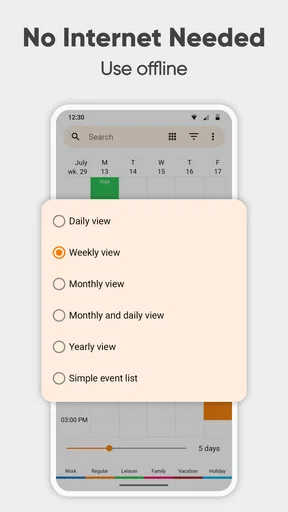
One of the things I appreciate most about Simple Calendar Pro is its focus on user experience. It’s lightweight and quick, which means no lagging or crashing at crucial moments. Plus, it’s available offline. So, even if you’re stuck on a flight with no Wi-Fi, you can still access your schedule.
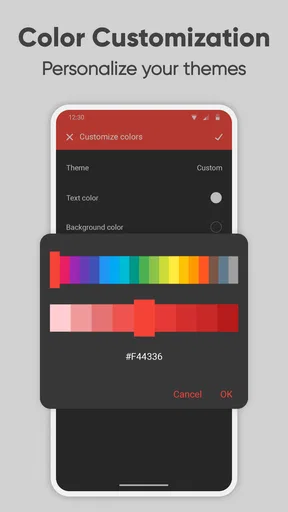
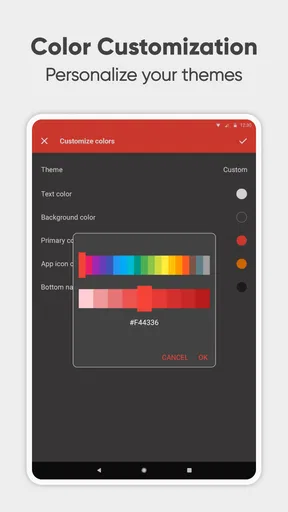
Customization is another strong suit. You can tweak the app to suit your personal style—choose from various themes, adjust the font size, and even decide how your week starts. I mean, who decided that weeks have to start on a Monday, anyway?
Where It Shines
The beauty of Simple Calendar Pro lies in its ability to offer exactly what you need without any of the clutter. It’s perfect for anyone who values efficiency and simplicity. If you’re tired of apps that try to do too much, you’ll find this one a breath of fresh air.
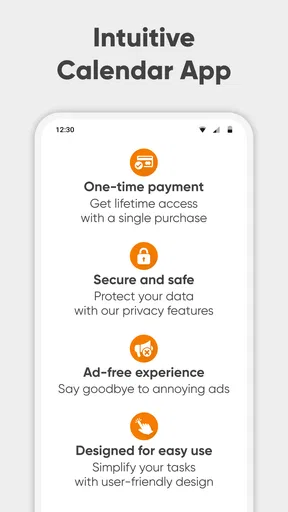
And the best part? It’s ad-free. I didn’t realize how much I valued this until I started using the app. There’s nothing more distracting than pop-ups when you’re trying to plan your day.
Final Thoughts
In a world full of complex apps that demand too much of our attention, Simple Calendar Pro is a trusted companion for those who crave simplicity. It’s got all the features you need without any of the noise. If you’re looking for a reliable, no-nonsense calendar app, this might just be your new best friend.
So, if you’re ready to bring a little more order to your life, give this calendar a whirl. It’s like having a personal assistant right in your pocket, minus the coffee runs.
Verdict
Strengths of Simple Calendar Pro
- Ad-free experience enhances usability.
- Customizable themes for personal touch.
- Offline functionality ensures access anywhere.
- Intuitive interface simplifies event management.
- No unnecessary permissions, ensuring privacy.
Limitations of Simple Calendar Pro
- Limited integration with other apps.
- Lacks advanced features like reminders.
- No cloud sync for cross-device usage.
- Occasional bugs in notification system.
- Updates are infrequent, missing new features.
Other Releases by Simple Mobile Tool
View All
Simple Voice Recorder
Music & Audio4.4

Simple Notes Pro
Productivity4.7
Similar Picks in This Category
View All
Google Calendar
Google LLC4.6

Google Drive
Google LLC4.3

Google Assistant
Google LLC3.9

Microsoft OneDrive
Microsoft Corporation4.6

Samsung Calendar
Samsung Electronics Co., Ltd.4.1

Microsoft OneNote: Save Notes
Microsoft Corporation4.6
Frequently Asked Questions
What features does Simple Calendar Pro offer?
Simple Calendar Pro provides a streamlined, ad-free experience with features like customizable themes, easy event creation, and offline functionality. It supports multiple calendar views such as daily, weekly, and monthly. Users can set reminders, sync with other calendars, and enjoy seamless integration with tasks and notes, making it a versatile scheduling tool.
Is Simple Calendar Pro compatible with other calendar apps?
Yes, Simple Calendar Pro is designed to integrate smoothly with other calendar applications. It supports synchronization with popular services like Google Calendar, ensuring that all your events and appointments are up-to-date across multiple platforms. This feature makes it an excellent choice for users who rely on multiple devices.
How user-friendly is Simple Calendar Pro for beginners?
Simple Calendar Pro is highly user-friendly, featuring an intuitive interface that even beginners can navigate with ease. The app includes a straightforward event creation process, customizable settings, and a clear layout, ensuring that users can manage their schedules without a steep learning curve. It’s designed for simplicity while offering essential features.
Does Simple Calendar Pro require an internet connection?
No, Simple Calendar Pro functions efficiently offline. While syncing with other calendars requires an internet connection, users can still create and edit events without one. This offline capability is particularly useful for users who need reliable access to their schedules in areas with limited connectivity.
What privacy features does Simple Calendar Pro offer?
Simple Calendar Pro prioritizes user privacy by functioning without requiring unnecessary permissions. It does not track user data or display ads, providing a secure environment for managing personal schedules. Users can rest assured that their information remains private and is not shared with third parties.
